Building Performant React Apps: Patterns and Pitfalls
Practical patterns and anti-patterns to keep React apps fast and maintainable — state colocation, memoization, rendering performance, and tooling tips.
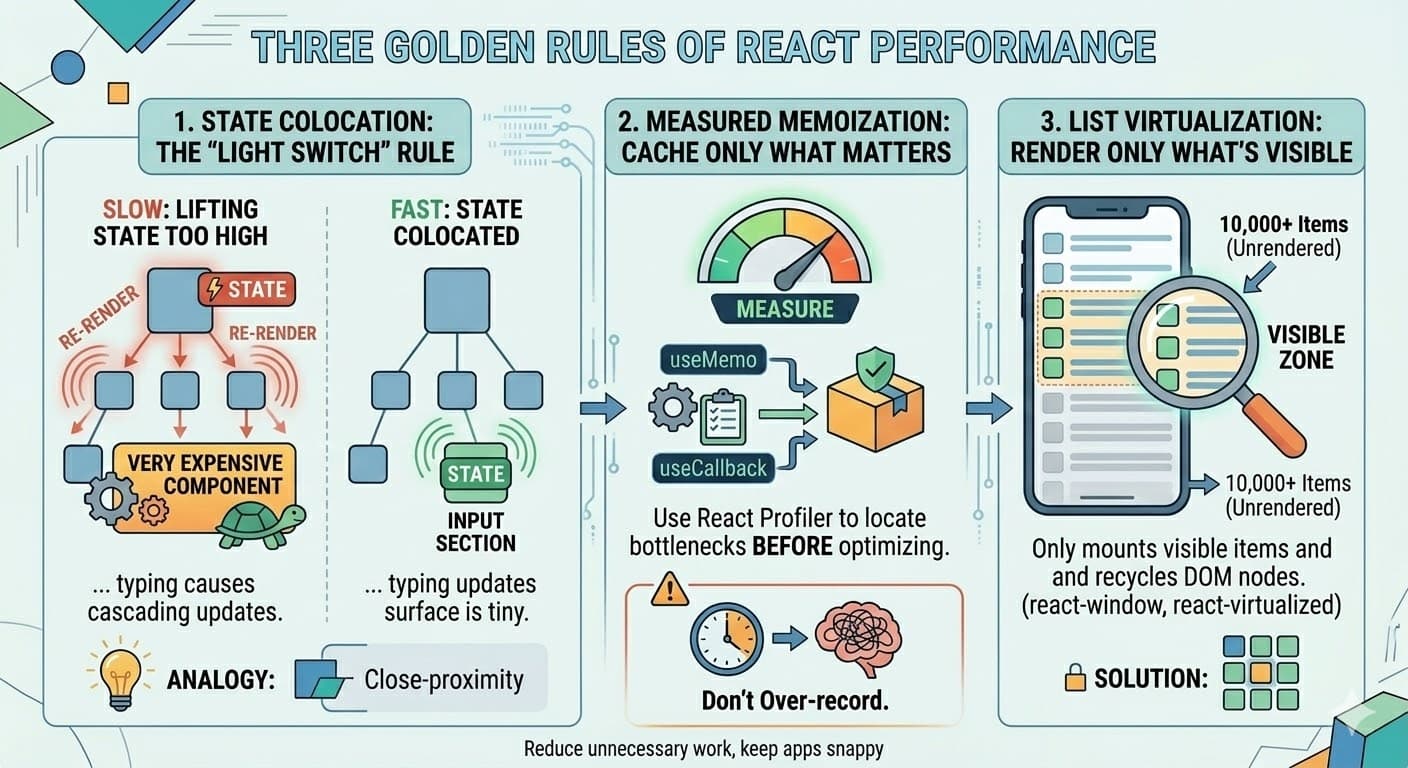
Performance matters. Fast apps feel better, convert better, and are easier to maintain. This post walks through pragmatic patterns I use to keep React apps snappy in the real world.
You don’t need a Ph.D. in computer science to fix a slow application – in React, performance usually comes down to a simple goal: reduce unnecessary work. Every time state changes React re‑renders components. If a tiny change forces huge, unrelated portions of the tree to update, the app feels sluggish.
Here are three golden rules that have helped me ship responsive interfaces again and again.
1. State Colocation – the “Light Switch” Rule
A major cause of lag is lifting state too high in the component tree.
Analogy: imagine your app is a house. If you put a single light switch at the front door that controls every bulb, flipping it causes every room to lose power and come back on. Instead, put the switch inside the room that actually needs it; only that light toggles.
In React we call this state colocation: keep data as close as possible to the component that uses it. This limits the “splash zone” of updates and avoids cascading re‑renders.
Example: before & after
Slow (state lifted too high): typing in the input causes the expensive component to re‑render on every keystroke.
// ❌ BAD: expensive component re‑renders on every keystroke
function App() {
  const [text, setText] = useState("");

  return (
    <div>
      <input
        value={text}
        onChange={(e) => setText(e.target.value)}
        placeholder="Type here..."
      />
      <p>Character count: {text.length}</p>
      <VeryExpensiveComponent />
    </div>
  );
}
Fast (state colocated): only the InputSection rerenders; the expensive component remains untouched.
// ✅ GOOD: state is colocated, update surface is tiny
function App() {
  return (
    <div>
      <InputSection />
      <VeryExpensiveComponent />
    </div>
  );
}

function InputSection() {
  const [text, setText] = useState("");
  return (
    <>
      <input value={text} onChange={(e) => setText(e.target.value)} />
      <p>Character count: {text.length}</p>
    </>
  );
}
2. Measured Memoization – cache only what matters
Memoization is just caching. React provides useMemo and useCallback to remember the results of expensive
calculations.
Warning: memoizing prolifically is like jotting down every thought in a notebook; soon the act of writing consumes more time than thinking. Always measure first – use the React Profiler to locate actual bottlenecks, then apply memoization judiciously.
3. List Virtualization – render only what’s visible
Rendering thousands of list items is heavy work. Imagine looking at 10 000 photos spread across the floor – you only ever see a handful at a time.
Solution: use list virtualization (e.g. react-window, react-virtualized), which mounts only the items that are
currently visible and recycles DOM nodes as you scroll.
Summary
By keeping state close to where it’s used, caching judiciously, and virtualizing long lists, you can build React applications that feel instant and effortless. The “light switch” analogy makes these concepts easy to explain to colleagues or blog readers – show the before/after code alongside the image and you’ll get the coveted “Eureka!” reaction.